

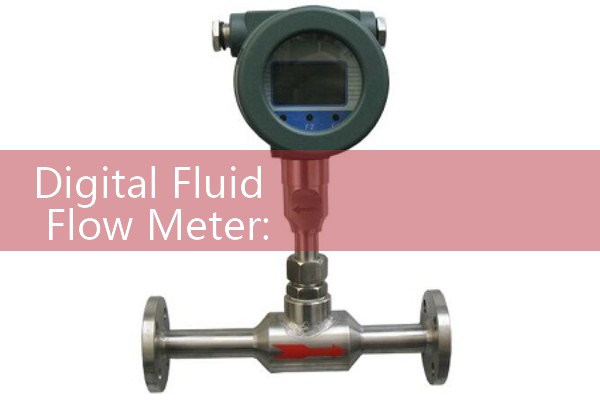
『Digital Fluid Flow Meter: Smart LCD Remote Telemetry Sensor Wiring Plans』Related information(flow rotameter|digital flow meter|balo meter|hydraulic flow meter|volumetric meter|positive displacement meter|pitot tube flow meter|displacement meter|cfm meter|variable area flow meter|inline flow meter|differential pressure flow meter|calibrated flow meter|velocity meter|paddle wheel flow meter|oval gear flow meter|anemometer hvac|multiphase flow meter|doppler flow meter|thorpe tube flowmeter|heat flow meter)

Digital Fluid Flow Meter: Smart LCD Remote Telemetry Sensor Wiring Plans
Quick Answer: Silver Instruments supplies digital fluid flow meters with smart LCD displays and remote telemetry sensor options. Standard wiring uses a 24 V DC supply, a 4-20 mA HART output, and a pulse output. Send your pipe size, flow range, pressure, and temperature to get a wiring plan matched to your model.
Many engineers ask us about the exact terminal wiring on our digital fluid flow meters. The wiring plan is simple when you split it into power, analog signal, pulse signal, and remote sensor cable. In practice, most field problems come from poor grounding or cable routing near VFDs.
Why a Smart LCD Display Changes the Wiring Logic
A digital fluid flow meter with a smart LCD is not a passive device. The LCD board draws a small current from the same 24 V DC loop. So the power supply must be sized for the sensor, the transmitter, and the backlight. For a SIL-EF10 electromagnetic flow meter, we recommend a 24 V DC supply rated at 2 A minimum. Do not share this supply with a heavy relay or solenoid valve.
The LCD shows total flow, real time flow, and diagnostic codes. You can program the display from the front panel without opening the enclosure. This keeps the IP67 rating intact. Most engineers skip this part on small skids and later face moisture issues.
Remote Telemetry Sensor Wiring Plan for a Digital Fluid Flow Meter
Remote telemetry means the sensor sits on the pipe and the transmitter sits in a panel. You need a shielded cable between the sensor and the transmitter. For electromagnetic flow meters, use a double shielded cable with a drain wire. The cable length should stay under 100 m for a standard electrode signal. For an ultrasonic flow meter, the sensor cable carries a low voltage pulse signal. Keep the cable under 150 m.
On the SIL-EF10 terminal block, wire the remote sensor as follows. Terminal 1 and 2 connect to the 24 V DC supply. Terminal 3 and 4 carry the 4-20 mA HART signal to the PLC or SCADA input. Terminal 5 and 6 are the pulse output. Terminal 7 and 8 are RS485 Modbus A and B. The remote telemetry sensor cable connects to a separate 4 pin connector on the bottom side. Always enter the cable gland from below to avoid water ingress.
Here is the thing. We have seen customer sites in Vietnam and the Philippines where cable trays run next to VFD lines. That induces noise on the pulse signal. Use a separate steel conduit or maintain 300 mm spacing from power cables.
Which Silver Instruments Flow Meter Fits Your Application?
For water and wastewater lines from DN15 to DN300, choose the Silver Instruments SIL-EF10 electromagnetic flow meter. It has an integrated LCD display, 4-20 mA HART, RS485 Modbus, and a pulse output. Use it in desalination plants, cooling water loops, and chemical dosing lines. For desalination plant lines, the SIL-EF10 works on fluids with a minimum conductivity of 20 µS/cm. This covers seawater, brackish water, and permeate.
For larger lines up to DN600 or temporary flow surveys, choose the SIL-US20 clamp on ultrasonic flow meter. It has a wall mount transmitter and a remote telemetry sensor cable. You can install it without cutting the pipe. This saves shutdown time. We have supplied this model to a paint manufacturer in Southeast Asia for solvent flow monitoring.
For diesel, fuel oil, or lube oil batching, choose the SIL-OG40 oval gear flow meter. It sends a pulse signal and works with a remote totalizer. The LCD version has a battery powered option. The pulse output wiring is simple. You connect the signal wire to a PLC high speed counter or a batch controller. For hazardous area skids, ask for the ATEX Zone 1 rated version. The wiring plan stays the same, but the cable gla
How to Connect the 4-20 mA HART Output to a PLC
Most PLC modules accept a 2 wire 4-20 mA loop. The flow meter powers the loop. You connect the positive terminal of the PLC analog input to terminal 3 on the flow meter. You connect the negative terminal of the PLC analog input to terminal 4. No external power supply is needed for the loop if the flow meter uses an active output. If you have a passive output model, add a 24 V DC loop supply in series.
Use screened twisted pair cable for the analog output. Strip the insulation back 8 mm. Tighten the terminal screws to 0.5 N m. We have seen loose terminals on vibrating skids cause random signal drops. After wiring, check the loop with a handheld HART communicator. The communicator should read the flow rate and totalizer value with no error codes.
What Cable Size and Gland Work Best?
Use 0.5 mm² to 1.5 mm² stranded copper wire for signal wiring. For power wiring, use 1.5 mm² wire. The cable gland size on the SIL-EF10 is M20 x 1.5. The cable outer diameter should be between 6 mm and 12 mm. Use a shielded cable for the remote telemetry sensor. Ground the shield only at the transmitter end. This prevents ground loops.
In marine and offshore installations, use marine grade cable with a low smoke zero halogen jacket. We have shipped meters to ocean platforms in Southeast Asia with this wiring plan. The local electrical inspector passed the panel because the grounding was clean.
Common Wiring Mistakes in Field Installations
One mistake is connecting the 24 V DC supply to the pulse output terminals. The pulse output on some models is an open collector. It cannot drive a relay coil directly. Use a 5 k ohm pull up resistor from the pulse terminal to the positive supply. Then measure the pulse frequency with a digital input module.
Another mistake is reversing the RS485 A and B wires. The LCD will show a communication error. Swap the two wires and restart the scan cycle. For Modbus RTU, set the baud rate to 9600 by default. The device address is 1 by default. Change the device address if you have more than one flow meter on the same bus.
FAQ
1. Can I power the digital fluid flow meter with 24 V DC and use pulse output?
Yes. The power supply and pulse output are isolated on most Silver Instruments models. Use a separate 24 V DC supply for the flow meter and a pull up resistor for the pulse circuit.
2. What cable type should I use for remote telemetry sensor wiring?
Use a double shielded twisted pair cable with a drain wire. For electromagnetic flow meters, keep the length under 100 m. For ultrasonic flow meters, keep the cable under 150 m.
3. Does the LCD show total flow and real time flow at the same time?
Yes. The smart LCD display has two lines. The top line shows real time flow. The bottom line shows total flow. You can scroll to see velocity, signal strength, and diagnostic codes.
4. Which outputs are standard on the Silver Instruments digital fluid flow meter?
Standard outputs are 4-20 mA HART, pulse, and RS485 Modbus. Some models also offer a relay output for flow alarms or batch control.
5. How do I get a wiring diagram for my pipe size and flow range?
Send us your pipe size in DN, flow range, pressure in bar, temperature in °C, and fluid name. We will send a wiring plan, dimensional drawing, and price quote within one working day.
For a wiring plan made for your site, contact Silver Automation Instruments. Tel: +86-135-1213-1526, WhatsApp: 86-135-12131526, WeChat: +86 13512131526. Tell us your pipe size, flow range, pressure, temperature, and fluid type. See flow-meter.com.au for product data sheets.
 Hot Blog
 Related AD